E-Government in Bulgaria: Taxes, Bills & Prescriptions Online
Start with the task, not a search for one government login. National taxes, municipal bills, utilities and health records use different services and identifiers. The table below directs you to the right route, with the Bulgarian labels to look for and the information to prepare.
Get your NRA PIK first: the 12-digit code that unlocks tax e-services without a costly electronic signature.
Local tax is municipal, not national: since March 2024 the NRA no longer handles property, rubbish or vehicle tax online.
The identifier is everything: EGN, LNCh, KIN, customer number. The right number for the right system beats fluent Bulgarian.
ePay is the practical shortcut: one place for tax, electricity and telecoms, if you register the exact right number.
E-prescriptions live in the system: the pharmacy looks them up by EGN or LNCh plus issue date. No paper slip needed.
Keep every receipt: "I paid but it still shows unpaid" is the national pastime. Proof saves you twice.
The screenshots show the portals as captured in May 2026. Use them to recognise terms, then check the current official starting links and instructions before entering identifiers or paying.
By Adrian Dane · First published May 2026 · Last verified 29 May 2026 · Shumen-specific routes throughout
If you only read one section before you start clicking, read this. It tells you which system owns which problem, so you stop hunting for a single Bulgarian government website that does not exist.
What you need to do
Who actually owns it
The route
Check or pay national income tax, see your tax account
NRA (National Revenue Agency)
NRA portal with your PIK or KEP
Pay property tax, rubbish fee, vehicle tax
Your municipality (since March 2024, not NRA)
Shumen municipality, ePay, or pay.egov.bg
Get the access code that unlocks tax e-services
NRA
Apply in person for a PIK at an NRA office
Pay your electricity bill
Energo-Pro (north-east Bulgaria)
vp.energo-pro.bg by customer number, or ePay
Pay your phone / internet bill
Vivacom (or A1, Yettel)
Anonymous pay page by customer number, or ePay
Consolidate several bills in one place
ePay (private aggregator, not government)
Register each bill by its exact customer number
Collect a prescription with no paper slip
NHIS (national health system)
Give the pharmacy your EGN/LNCh + issue date
Pay a traffic fine online
Central eGov payment portal
pay.egov.bg, searchable by EGN
The reality for most British expats: a paper bill in one hand, a Bulgarian portal on the laptop, working out which customer number goes where. Once the routine is set up, it takes minutes a month.
🧮
Stop looking for the Bulgarian GOV.UK
There isn't one. The closest mental model: one national tax portal (NRA), one separate system per municipality, one private bill aggregator everyone uses (ePay), a handful of utility portals, and a health system. Match the task to the owner and the fog clears.
Section 2
What you need before you start: the identifier problem
The single biggest reason a British expat gets stuck is the identifier. You expect one login. Bulgaria gives you up to nine different numbers, and each system wants a specific one. Sort this out before you open a single portal.
In the UK you have, more or less, one set of credentials per service and your name and address usually find your account. Bulgarian systems identify you and your obligations by number, and there are several numbers in play. Which one a given portal wants is rarely obvious from the page. This table is the thing to screenshot and keep on your phone.
Number
Bulgarian
What it is / when you need it
EGN
ЕГН
Bulgarian personal number, held by citizens and some permanent residents
LNCh
ЛНЧ
The personal number for foreigners; most long-stay Brits use this where a portal says ЕГН
NRA PIK
ПИК
12-digit access code for tax e-services, issued by the NRA
KEP / QES
КЕП
Qualified electronic signature; stronger, on a card or token, usually not needed for simple payments
KIN / PIN
КИН
Client number some municipalities issue for local-tax access (Shumen uses one)
EIK
ЕИК
Company identifier, needed if a property or account is company-owned
Customer number
клиентски номер
Issued by each utility (electricity, internet) per account
Subscriber number
абонатен номер
Same idea, used by some providers and district heating
Invoice number
номер на фактура
Sometimes used for one-off payments instead of the account number
Your EGN or LNCh, written down (you will type it repeatedly)
Your NRA PIK, once issued (see Section 4)
Your municipal KIN/PIN letter, if you own property (keep the original safe)
Your latest paper bills, for the customer numbers (not old ones)
A Visa or Mastercard that works for online Bulgarian payments
A folder (digital or paper) to keep every PDF receipt and payment reference
⚠️
The customer number is on the latest bill, not the router
The most common self-inflicted error is using an old or wrong customer number: the one stuck to the router by the previous owner, the one on a two-year-old invoice, or the landlord's master account instead of your apartment's sub-account. Always copy the number from your most recent invoice, SMS or email.
Section 3
The Bulgarian words that matter
You do not need to read Bulgarian. You need to recognise about fifteen labels on sight, the way you recognise a road sign without reading a sentence. Learn these and you can navigate any of the portals in this guide by shape and keyword.
Bulgarian
Transliteration
What it means on the screen
Местни данъци и такси
mestni danatsi i taksi
Local taxes and fees (property, rubbish, vehicle)
Задължения
zadalzheniya
Liabilities / amounts due
Плащане
plashtane
Payment
Проверка
proverka
Check / lookup
Е-услуги
e-uslugi
E-services
Вход
vhod
Login / enter
Регистрация
registratsiya
Register / sign up
Клиентски номер
klientski nomer
Customer number
Абонатен номер
abonaten nomer
Subscriber number
Фактура
faktura
Invoice
Сметка
smetka
Bill / account
Плати сега
plati sega
Pay now
Добави
dobavi
Add (e.g. add a bill to track)
Потвърди
potvardi
Confirm
Квитанция / Разписка
kvitantsiya / razpiska
Receipt
💡
The browser-translate safety net
Chrome and Edge both offer "Translate to English" on right-click. It is imperfect on form labels and sometimes mangles button text, but it is a useful second opinion. Use it to confirm, not to navigate; the Bulgarian labels above are more reliable because they do not move when the translation engine guesses wrong.
Section 4
Getting your NRA PIK/PIC
Checked 3 October 2026: NRA explains its application and collection routes on the PIK service page. Check the current instructions and authorised-representative requirements; applying for a code and collecting it are different steps.
Official starting point: NRA services portal. Confirm the service and login method on the portal before entering personal information.
The NRA PIK is the master key for tax e-services. It is a 12-digit personal identification code from the National Revenue Agency, and it lets you into a range of services without buying a qualified electronic signature. Get it early; it unlocks more than you first realise.
The NRA (Natsionalna Agentsiya za Prihodite, the National Revenue Agency, sometimes written NAP) is Bulgaria's HMRC equivalent for national taxes and social insurance. Its PIK (Personalen Identifikatsionen Kod) is a free 12-digit code that authenticates you for many of its online services. A qualified electronic signature (KEP) would also do the job and more, but it costs money, lives on a smartcard or USB token, and is overkill for what most British expats need.
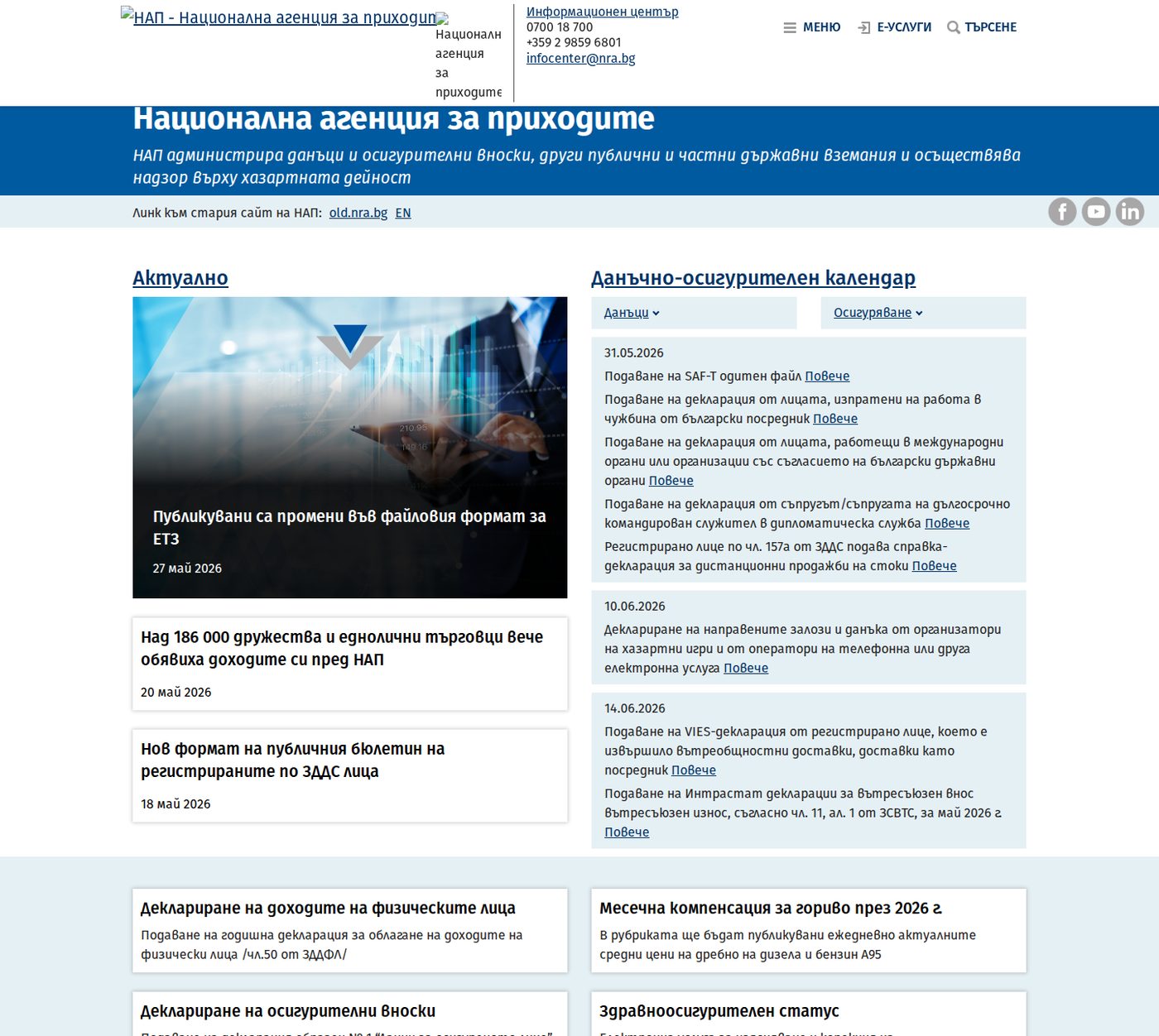
The NRA home page (nra.bg). Look for Е-услуги (e-services) and the login options offering ПИК (PIK) or КЕП (electronic signature). Captured 29 May 2026; the UI may change but the Bulgarian labels usually stay similar.
How to apply
Go in person to an NRA office. For ordinary foreigners the PIK is collected in person; you cannot simply self-issue it online. The Shumen NRA office handles the region.
Complete the application ("Заявление за ползване на електронни услуги, предоставяни от НАП, чрез персонален идентификационен код"). It asks for your personal details, a correspondence email address, and which NRA office you want to collect the code from.
Bring ID and your Bulgarian number. Passport, residence card, and documentation of your EGN or LNCh. If you only have an LNCh, ask the desk specifically how to use it in portals that visually display ЕГН.
Receive the code. The PIK is issued to you. NRA guidance notes that your first login with your identifier and PIK triggers an automatic email to the correspondence address you listed.
Treat the PIK like a bank card PIN
The PIK is personal and sensitive. It is not a casual password to hand to an estate agent, an accountant or a neighbour "to sort out the tax". Anyone with your identifier and PIK can see your tax affairs. If an accountant genuinely needs access, understand exactly what they will see before you share it, and consider changing it afterwards.
PIK versus KEP: which do you need?
For the needs of almost every Shumen.UK reader, the PIK is enough: checking your tax account, viewing obligations, and the access routes that feed into local-tax and payment systems. A KEP (qualified electronic signature) is only worth the cost and hassle if a specific service forces it on you, which for personal, non-business use is rare. Do not let anyone upsell you a KEP for paying your house tax; you do not need it.
🔑
What the PIK does and does not unlock
The PIK gets you into NRA national-tax e-services and is accepted as a login route by some other administrations. It does not, on its own, make the NRA website the place you pay your property tax: since March 2024 that moved away from NRA entirely (Section 5). Think of the PIK as the key to the tax-account door, not to every government building.
Section 5
Property, rubbish & vehicle tax: who actually collects it
This is the single most important thing to get straight, because getting it wrong sends you to the wrong website for an hour. Your house tax, your bin tax and your car tax are municipal, not national. The NRA does not collect them, and since March 2024 the NRA does not even handle them online.
Bulgarian local taxes and fees (mestni danatsi i taksi) cover the building/property tax, the waste/rubbish fee, and the vehicle tax, plus some acquisition, patent and tourist taxes depending on the case. These belong to your municipality, the obshtina. For Shumen.UK readers that means Obshtina Shumen.
📢
The March 2024 change that catches everyone
Until 2024 the NRA's own e-services platform handled local-tax declaration and payment. From 1 March 2024 the NRA stopped: electronic declaration and payment of local taxes and fees now runs through the Ministry of Electronic Government portal (pay.egov.bg) and the municipalities' own systems. If a forum post or an old blog tells you to pay your house tax "on the NRA site", it is out of date.
Your three routes to pay local tax
Whichever you choose, the destination is the same: the money reaches Obshtina Shumen and the obligation is marked paid. They differ in how you authenticate and how much friction there is.
Route A, the municipality direct. Shumen's own local-tax pages and its virtual POS, or ePay. Best if you have your KIN. Covered in Section 6.
Route B, the central eGov portal. pay.egov.bg can query every connected municipality for what you owe against your EGN. Best if you have a QES or want one place for fines too. Covered in Section 7.
Route C, plain bank transfer. Pay the municipality's IBAN with the exact payment code. Best if the online routes will not recognise your identifier. Covered in Section 8.
🚗
Vehicle tax is not paid at KAT
A common confusion: the annual vehicle tax (danak varhu prevoznite sredstva) is a municipal tax, paid to the obshtina, not to KAT (the traffic police) and not to the NRA. KAT handles registration, plates and the technical inspection regime; the tax itself is local. See our Car Ownership guide for the inspection and registration side.
Section 6
Paying Shumen local taxes online (Route A)
Checked 3 October 2026: The municipality confirms local-tax lookup through its linked tax portal, with identifier/KIN, electronic-signature and NRA PIK options. Follow the link from the official municipal instructions. The May screenshots remain historical; no account login or test payment was performed.
The Shumen municipality website (shumen.bg) carries a Local Taxes and Fees section with a lookup tool, a vehicle-tax calculator, payment pages and the bank details. For most resident property owners this is the most direct route, provided you have your KIN.
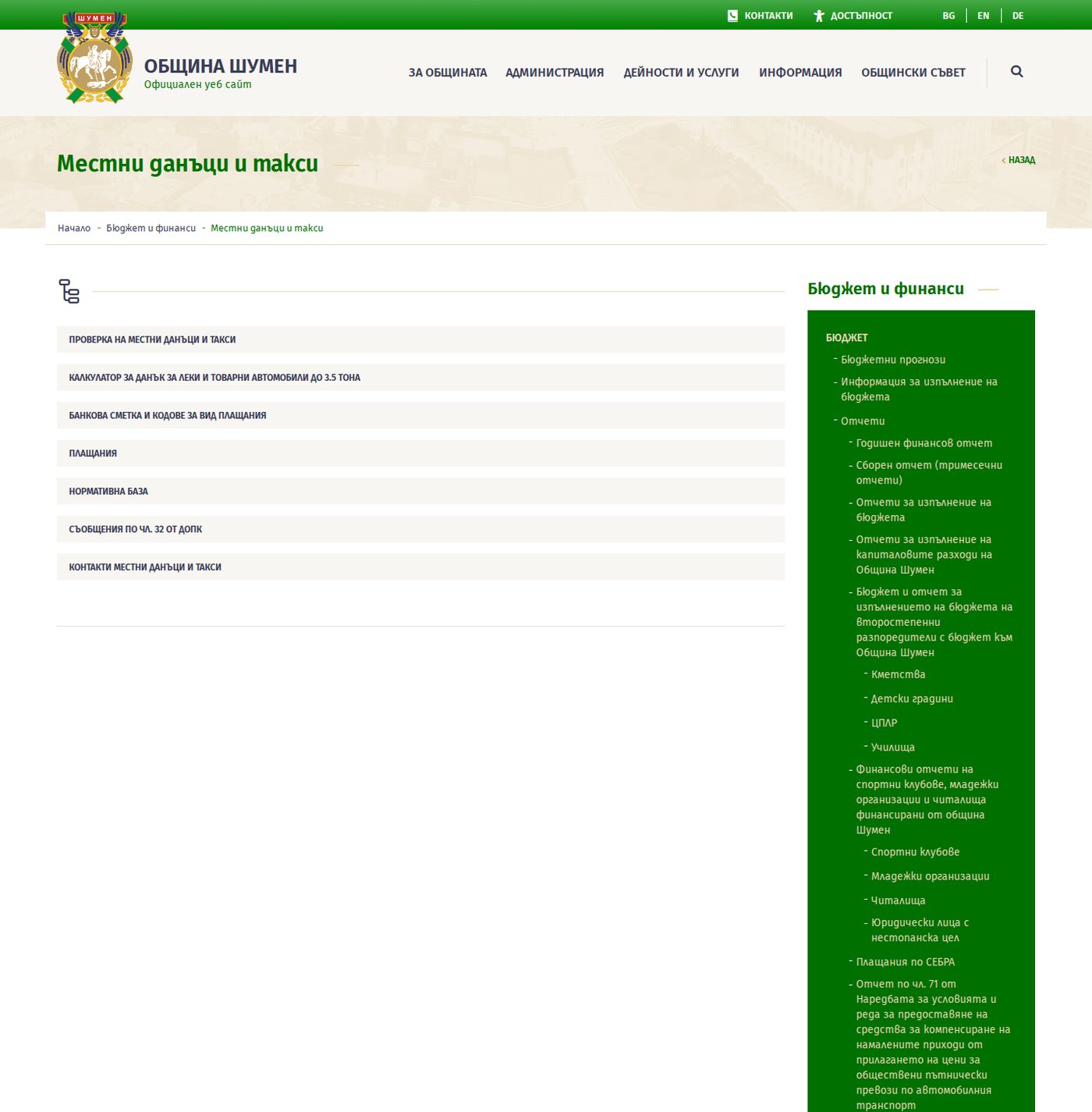
The Shumen municipality Местни данъци и такси (local taxes and fees) page on shumen.bg. The key links: Проверка на местни данъци и такси (check your local tax), the vehicle-tax calculator, and Плащания (payments). Captured 29 May 2026.
Step by step
Go to the Shumen municipality local taxes page (shumen.bg, the Местни данъци и такси section).
Click Проверка на местни данъци и такси (check local taxes and fees).
Log in by the route the page offers: EGN/EIK plus your KIN, a digital certificate (QES), or your NRA PIK, depending on what is accepted.
Confirm the taxpayer and the property or vehicle shown are actually yours before paying.
Pay via the Shumen virtual POS terminal (card payment on shumen.bg) or via ePay if offered.
Save the PDF or screenshot receipt. Note the reference number.
What Shumen accepts to identify you
Shumen's own notices list the local-tax login routes as: EGN/EIK together with the KIN (issued free by the Local Taxes and Fees department), a digital certificate / electronic signature, or the NRA PIK. The payment routes it lists are: cash at the municipal desks, internet via ePay.bg for registered ePay/EasyPay users with Visa or Mastercard, card via the municipal virtual POS on shumen.bg, electronic payment via the Ministry of Electronic Government portal, and bank transfer to the municipal account.
The KIN letter is the piece you must not lose
The KIN (client identification number, sometimes PIN) is the identifier the Shumen lookup most often wants, and it is issued free by the Local Taxes and Fees department, often as a small printed letter when you first register a property. This is the single thing foreigners most often cannot find when ePay or the municipal lookup asks for "an identifier that is not just your name". File it the day you receive it. If you have lost it, the Local Taxes and Fees department can reissue it; bring ID and proof of ownership.
Section 7
Using eGov & pay.egov.bg (Route B)
Use the Bulgarian e-government portal to locate the responsible authority. Municipal processes can differ; the Shumen walkthrough below is a local example.
pay.egov.bg is the central electronic payment entry point for both national and local administration. It is the official strategic route for local-tax e-payments after the 2024 change, and it can show fines as well as tax. It is also Bulgarian-first and login-dependent, so it suits some readers more than others.
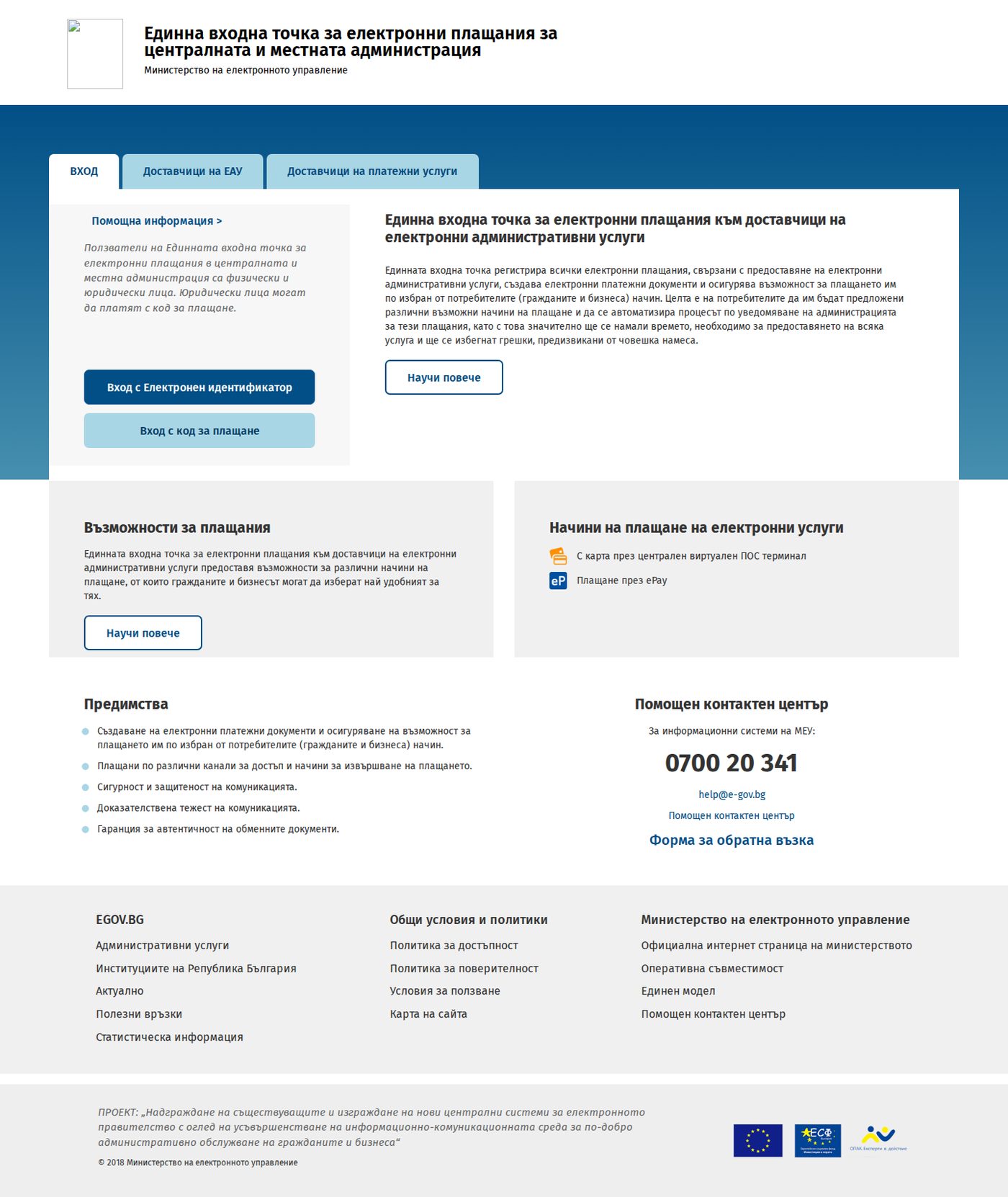
The central payment portal at pay.egov.bg. Login is by QES (electronic signature), a payment code, or an automatic redirect from another government system. Captured 29 May 2026.
Step by step
Go to egov.bg or pay.egov.bg by the official route (type the address yourself, do not follow a search ad).
Authenticate with your QES, or a payment code, where the flow offers it.
Open Моето пространство (My space) then Задължения (liabilities).
Choose Задължения за местни данъци и такси (local taxes and fees liabilities). The system queries every connected municipality against your EGN.
Check the municipality and the obligation type are correct.
Pay by the central virtual POS if displayed; the help page states this is offered without fees or commissions for citizens.
Save the payment confirmation.
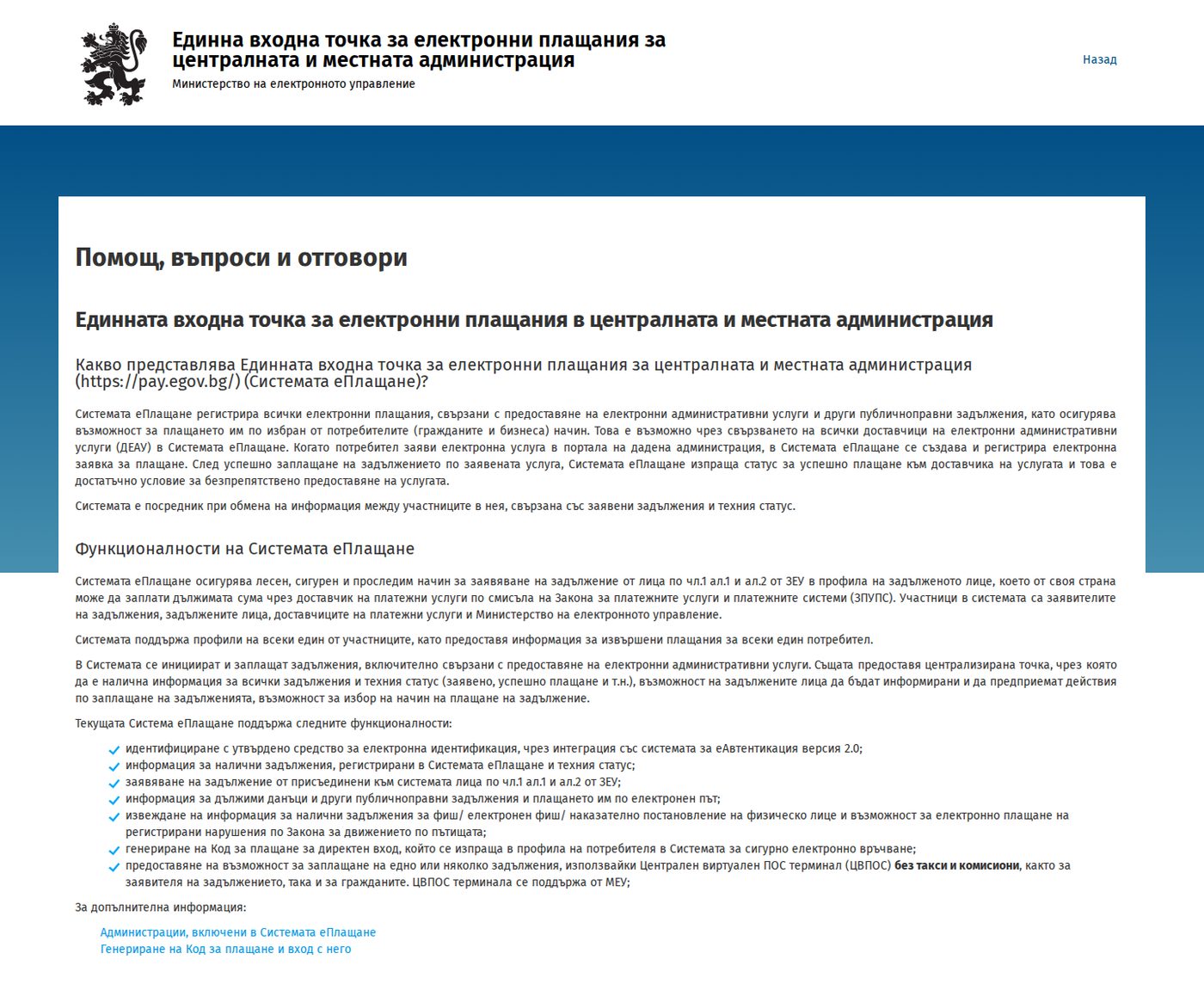
The pay.egov.bg help page is the official explanation of how local-tax queries, e-fines and payment codes work. Worth a read once via browser-translate before you rely on the portal. Captured 29 May 2026.
⚖️
Is eGov worth it for a once-a-year house-tax payment?
Honestly, for a British retiree who only needs to pay Shumen property tax once a year, the Shumen municipality route (Section 6) or a bank transfer (Section 8) is often simpler than wrestling with eGov's authentication. eGov earns its place if you have a QES anyway, if you want to see obligations across multiple municipalities, or if you also need to pay traffic fines. If eGov feels like a maze, that is not your Bulgarian failing you; Bulgarians complain about it too. The trick is knowing the exact label to look for.
Section 8
The bank-transfer route (Route C)
If the online lookups will not recognise your identifier, or you simply prefer your own online banking, you can pay local tax by direct bank transfer to the municipality. It works, but only if the payment reference is exactly right, or a small unpaid balance will haunt you later.
Use this route when the municipality gives you the precise details. You will need all of:
The municipality's IBAN for local taxes
The payment code (vid plashtane) for the specific tax type: property, rubbish, or vehicle each has its own code
The taxable person identifier (your EGN/LNCh/EIK)
The year and liability type the payment is for
The property or vehicle identifier where required
Vague payment descriptions are how small debts are born
The classic failure: you transfer roughly the right amount but write "tax" or nothing useful in the reference. The municipality cannot match it cleanly, allocates it oddly (often oldest debt first), and a small current-year balance is left unpaid. Months later you discover a tiny outstanding amount with interest accruing. Always include the exact payment code, the year, and your identifier in the transfer reference. If in doubt, take the municipality's printed payment slip to your bank and copy it verbatim.
💳
The proof bank transfers give you
One genuine advantage of the bank route: your bank statement is durable, dated, independent proof that you paid, with the reference you typed. If the municipality ever loses a record, that statement is your evidence. See our Banking guide for online-banking setup and transfer mechanics in Bulgaria.
Section 9
Using ePay without registering the wrong bill
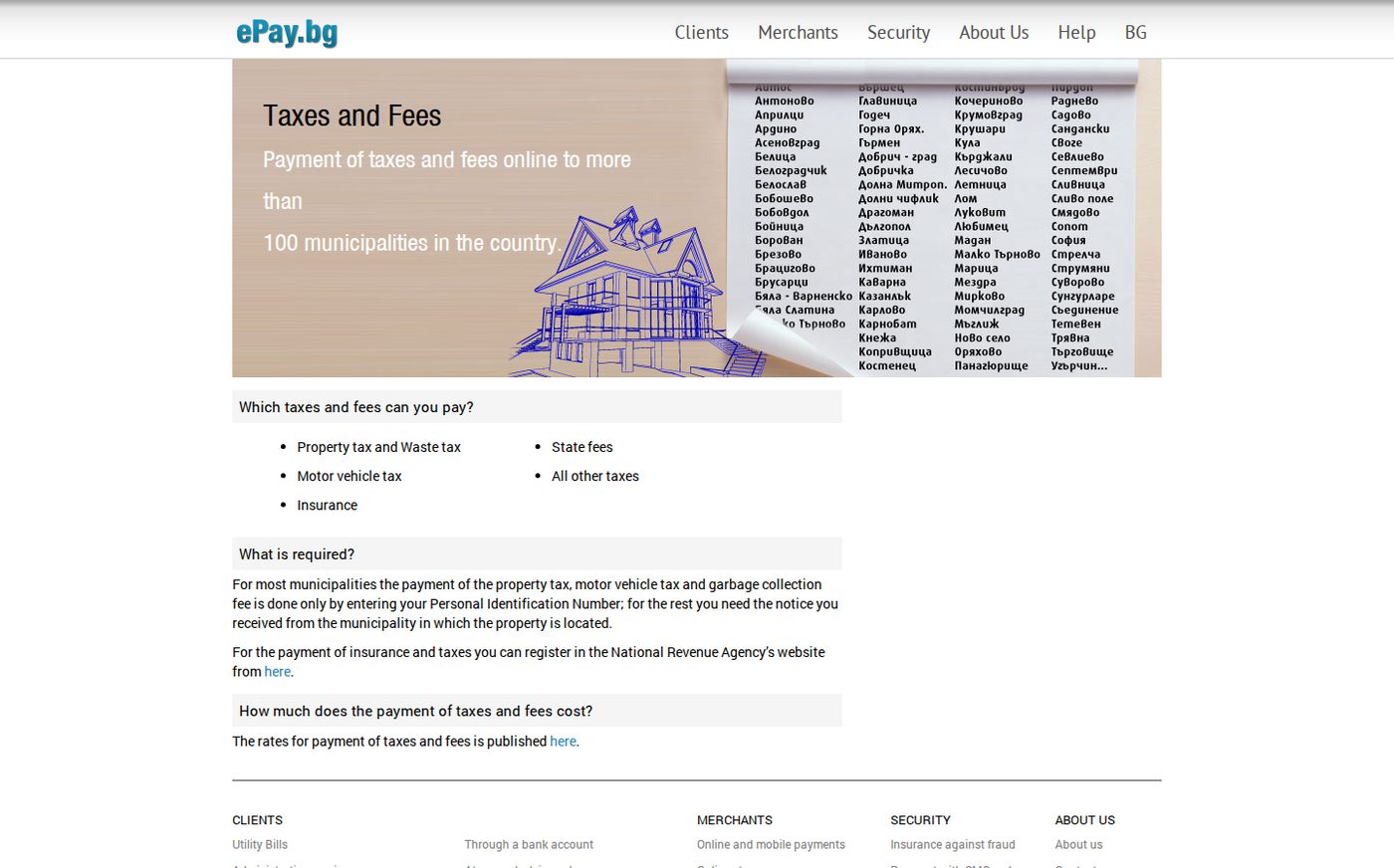
ePay.bg is the practical middle layer that most Bulgarians and many foreigners use, because it aggregates local tax, electricity, water and telecom bills in one place. It is not government; it is a private payment platform, but it is deeply wired into Bulgarian bill-paying culture through the ePay/EasyPay network. The one rule: register the exact right number.
The ePay.bg local taxes and fees page (English interface available). ePay aggregates municipal taxes alongside utility bills, but it finds your obligation only when the registered customer number matches exactly. Captured 29 May 2026.
How to use it well
Register an ePay account (or use the linked EasyPay network).
Add each bill by its exact customer/subscriber number or, for Shumen tax, your EGN/EIK plus KIN.
ePay then monitors that bill and can notify you each month.
Pay by registered card; check the fee shown for the route before confirming.
Save the ePay receipt, and cross-check at the provider or municipality after a few days if anything looks off.
"ePay says I owe nothing" does not mean you owe nothing
If ePay cannot find your property tax, that is not proof you are clear. It usually means the municipality has not matched your identifier, your KIN is missing or wrong, the property has not been processed after a recent purchase, or the obligation has moved into a different collection status. Equally, ePay can keep showing a bill as unpaid for days after you have paid it by another route, until the provider feed refreshes. Treat ePay as a convenient view, and the municipality or provider system as the source of truth.
⚠️
Register the apartment, not the whole building
A recurring trap for renters and flat owners: registering the landlord's or building's master account number instead of your specific apartment sub-account. You then either pay someone else's share or cannot see your own. Confirm the number on your invoice matches what you register.
Section 10
Paying Energo-Pro electricity online
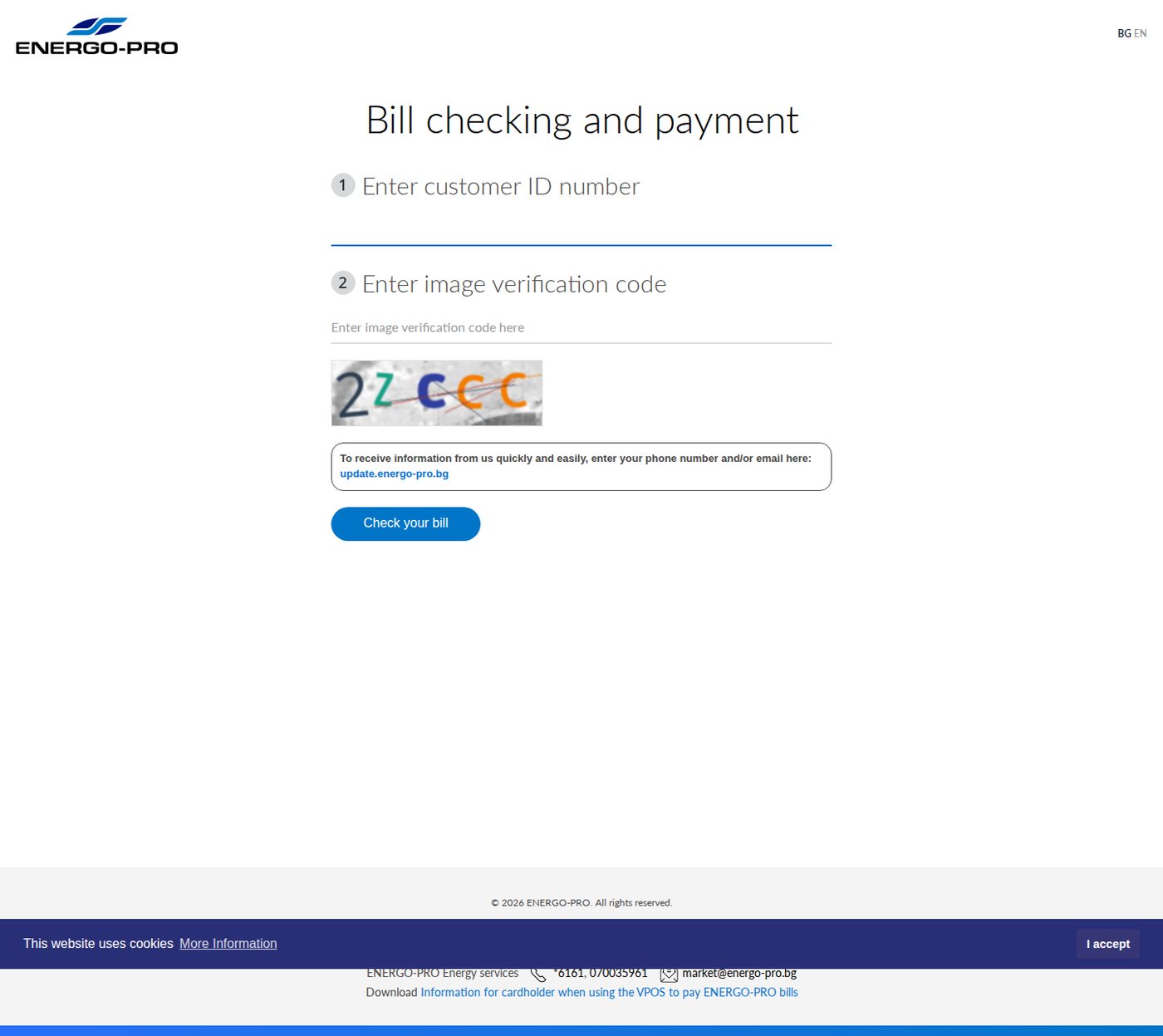
Energo-Pro is the electricity supplier for Shumen and north-east Bulgaria. It has a direct online payment page with an English option, and the only thing it really cares about is your 10-digit customer number.
The Energo-Pro direct payment page (vp.energo-pro.bg, English option top right). Enter your клиентски номер (customer number) and the captcha, and it shows your invoices to pay by card. Captured 29 May 2026.
Step by step
Find your 10-digit customer number (klientski nomer) on a recent Energo-Pro invoice or cash receipt. If you cannot find it, call 0700 800 61.
For a one-off payment, go to vp.energo-pro.bg (switch to English if you want). For ongoing account access, register in the MyEnergo-Pro customer portal instead.
Enter the customer number and the captcha code.
Check the invoice period and the amount.
Pay by card.
Save the receipt.
Energo-Pro also accepts payment through ePay.bg, EasyPay, Bulgarian Post, customer service centres, bank transfer, direct debit, electronic banking and ATM/BPay routes, so the direct page is just the quickest for a one-off. The household-customer information portal asks for the same 10-digit number and confirms it is printed on your last cash receipt or invoice.
The village-house electricity trap
If you bought a village house, the electricity account may still be in the previous owner's name. You can often still pay by customer number, which keeps the supply on, but account management (e-invoices, direct debit, changing the contract) usually requires transferring the customer data into your name at an Energo-Pro office first. Do the transfer early; paying a stranger's account indefinitely stores up problems when something needs changing. See the Utilities guide for the transfer process.
Section 11
Paying Vivacom online
Vivacom is one of Bulgaria's big three telecoms (alongside A1 and Yettel) and the most likely fixed-line and internet provider for a Shumen home. It offers an anonymous pay-by-customer-number page, a full My Vivacom account, and the usual ePay route.
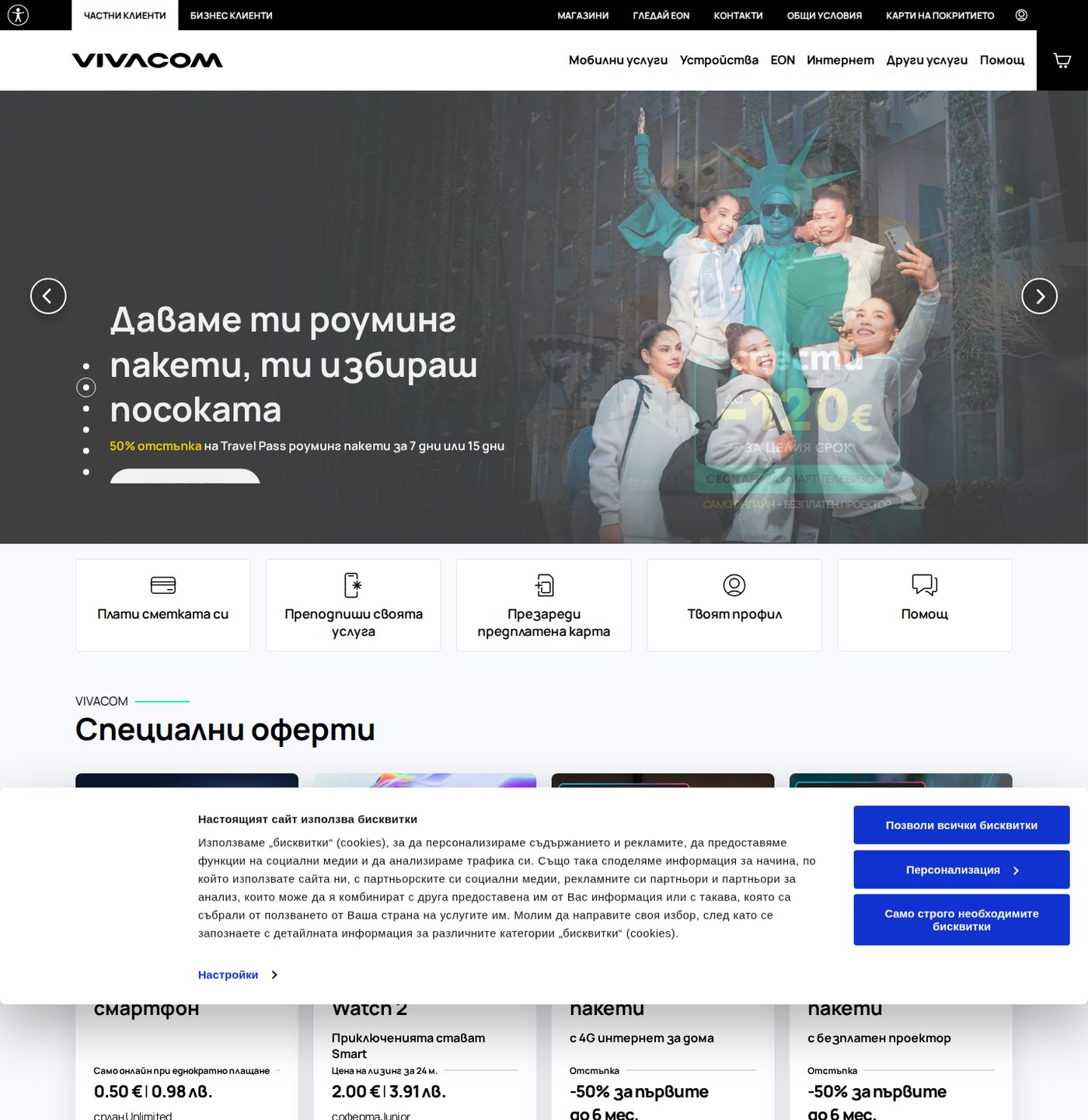
Vivacom's bill payment page. The anonymous payment route lets you pay by customer number without logging in, secured via SSL and BORICA. Captured 29 May 2026.
Three ways to pay
My Vivacom (app or web) if the account is already in your name: best for ongoing management and seeing your full bill history.
Anonymous bill payment at vivacom.bg if you have the customer number but do not want to log in: enter the number, pay by card.
ePay if you want the Vivacom bill consolidated with your electricity and tax: register the Vivacom customer number in ePay's utility payments.
Vivacom's FAQ confirms monthly bills can be paid through ePay.bg, iCard.bg, EasyPay and other routes, and that online payment uses SSL and BORICA security. Save the electronic receipt whichever route you use.
⚠️
Old Bulsatcom numbers no longer work
Vivacom absorbed parts of the former Bulsatcom customer base, so some households have old Bulsatcom details and a new Vivacom customer number. Always use the customer number from your latest Vivacom invoice, SMS or email, not an old account number stuck to the router or remembered from the previous service.
Section 12
District heating (Toplofikatsiya)
If your home has central district heating, this section applies; if you heat with electricity, wood or a heat pump (most of the Shumen region), you can skip it. The key fact: there is no single national Toplofikatsiya interface. It is city-by-city and company-by-company.
District heating in Bulgaria is run by separate municipal or regional companies, each with its own billing system and its own (or no) online portal:
Toplofikatsiya Sofia has its own payment information, with cash and partner routes including Fast Pay locations.
Toplofikatsiya Ruse allows payment via ePay after registering by subscriber number, but warns that some overdue or legal-entity cases are not offered for online payment.
EVN Bulgaria Toplofikatsiya and Toplofikatsiya Varna appear in ePay's merchant directory.
Toplofikatsiya Shumen exists as a company, but no strong consumer self-service portal was found at the time of writing; Shumen-area readers are far more likely to need the Energo-Pro, water and telecom routes than a modern Shumen district-heating portal.
🔥
Search your city, not the country
Do not search for "Toplofikatsiya Bulgaria". Search for your specific city or company (Toplofikatsiya Sofia, Toplofikatsiya Ruse) and pay using the exact subscriber number (abonaten nomer) from your heating bill. The subscriber number is the identifier these systems key on, and it is usually different from your electricity customer number.
Section 13
E-prescriptions: what to say at the pharmacy
Most Bulgarian prescriptions now live in the National Health Information System (NHIS). You usually have no paper slip; the pharmacist looks the prescription up by your patient identifier plus the issue date. Knowing what to hand over turns a confusing exchange into a 30-second transaction.
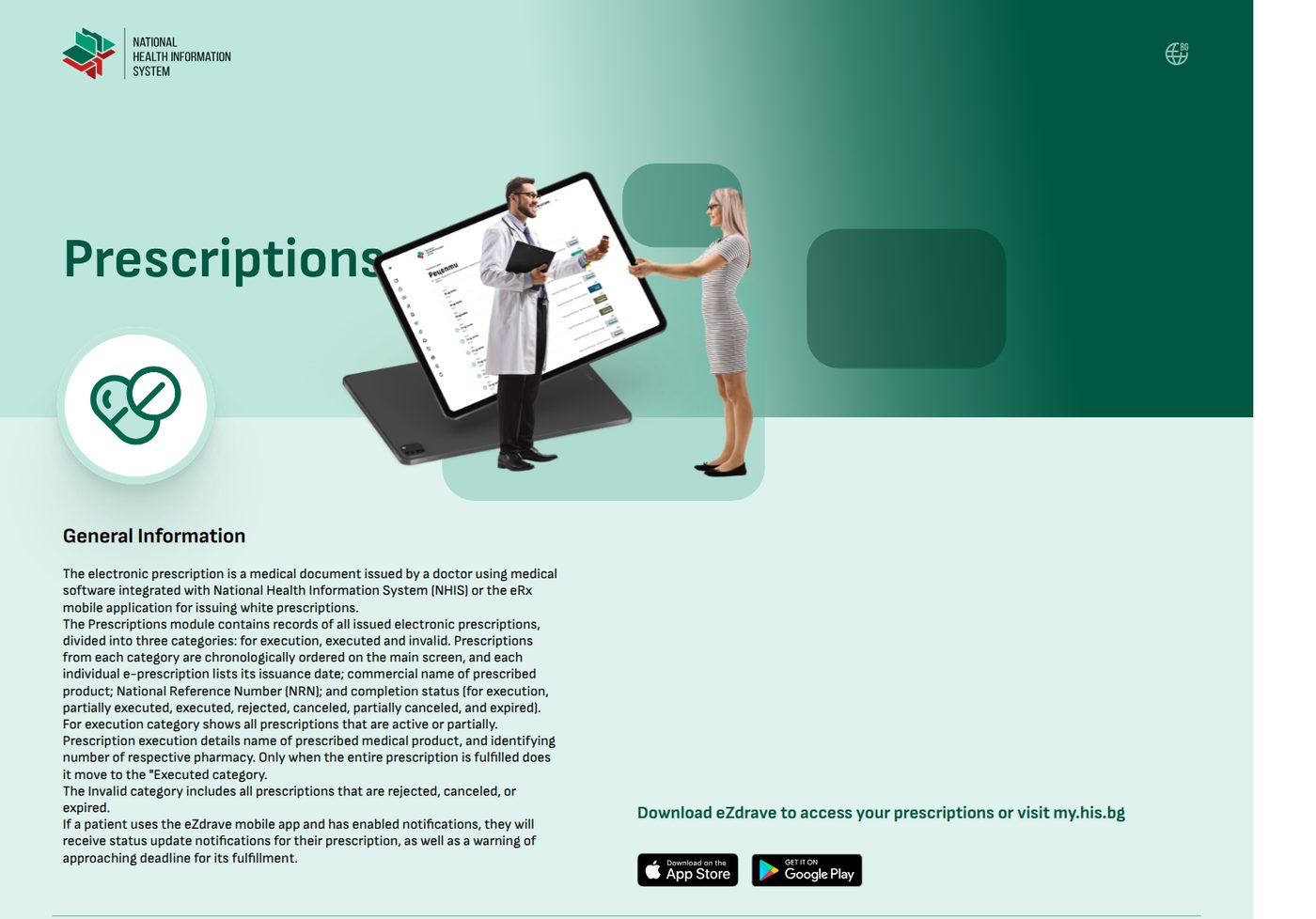
The NHIS (his.bg) prescriptions explainer, English version. Citizen access to your own electronic health record is via qualified electronic signature at my.his.bg or the eZdrave mobile app, but for pickup the pharmacist does the lookup. Captured 29 May 2026.
How pickup actually works
When your doctor issues an electronic prescription, it is logged in the NHIS against your identifier. At the pharmacy, for NHIF-covered prescriptions the pharmacist checks the system by patient identifier plus issue date: that identifier can be your EGN, your LNCh, a service/insurance number, and the foreign-person insurance number where applicable. No paper is needed because the prescription is in the national database.
What to bring
Your ID card, residence card or passport
Your EGN or LNCh, whichever the doctor used to issue it
The date the prescription was issued
A QR code or prescription number if the doctor or the eZdrave app gave you one
Your NHIF booklet or card details where the medication is reimbursed
💬
The one question that prevents most failures
Before you leave the doctor, ask: "Which number did you issue it against, EGN or LNCh, and what date should I give the pharmacy?" The overwhelming majority of pickup failures are an identifier or date mismatch, or a misspelt foreign name, not the pharmacist refusing you. If the pharmacy genuinely cannot find it, call the doctor and ask them to confirm the identifier and date.
Useful Bulgarian at the counter
Електронна рецепта
Elektronna retsepta
"Electronic prescription".
Можете ли да проверите по ЛНЧ?
Mozhete li da proverite po LNCh?
"Can you check by LNCh?" The key phrase if the pharmacist defaults to looking for an EGN.
Имам QR код
Imam QR kod
"I have a QR code". Offer it if the doctor or app gave you one.
Дата на издаване
Data na izdavane
"Issue date". The second thing the pharmacist needs after your identifier.
This overlaps with our dedicated Pharmacy guide, which covers the wider picture: the 2026 e-prescription crackdown on antibiotics and diabetes drugs, the active-ingredient rule, bringing UK prescriptions, and the major chains. If your prescription is for an antibiotic or diabetes medication, read that guide too; those categories are the most rigidly e-script-gated.
Section 14
Receipts, proof & common failure modes
"I paid, but it still shows unpaid" is the single most common complaint among foreigners using Bulgarian payment systems. It is almost never a lost payment. It is a sync or matching issue, and the cure is the same every time: keep proof, and verify at the source.
Why a paid bill still shows as owing
The provider feed has not refreshed. ePay and aggregators update on a lag; allow a few working days.
You paid by bank transfer but ePay still shows it. Different channels, different update cycles.
The registration watches the wrong number. ePay is tracking a customer number that is not the one you actually paid against.
The bill is under the previous owner or landlord. Your payment and the displayed obligation are on different accounts.
Oldest debt was paid first. Your payment cleared an old balance, leaving a small current one.
The obligation moved into legal collection. It no longer appears in the normal online payment route.
The receipt discipline that saves you twice
Save the PDF or screenshot receipt for every payment, with its reference number
Keep bank-transfer confirmations; your statement is independent dated proof
After paying, re-check in the original provider or municipality system after a few working days, not just in ePay
If a small residual balance appears, pay it promptly; interest accrues on tiny sums too
Keep a simple log: date, what, how much, reference, which system
🧾
Verify at the source, not the aggregator
ePay is a convenient view, but the municipality's own system and the utility's own portal are the source of truth. If there is ever a discrepancy, believe the source system and keep your receipt. A dated payment reference has resolved more "but I paid it" disputes than any amount of arguing.
Section 15
Owning the property is not the same as owning the portal access
A specific, costly surprise for British buyers: completing the purchase at the notary does not automatically hand you working online accounts for tax and utilities. The records and the portals lag behind the deed, and you have to push them into line.
After you buy a Bulgarian property, the notary process and the municipality's records do not always produce a smooth online account. To get to the point where you can actually pay everything online in your own name, you usually need to:
Check the municipality has processed the ownership transfer. Until it has, local-tax lookups may show the old owner or nothing at all.
Obtain a KIN/PIN from the Local Taxes and Fees department, in your name, for the property.
Switch the utility customer records (electricity, water, internet) out of the previous owner's name at each provider.
Make sure any ePay registration points at the current bill and the current customer number, not an inherited one.
🏠
Do the boring admin in the first month
The temptation after completion is to relax. But the longer the accounts sit in the previous owner's name, the harder a future problem is to untangle (a meter dispute, a contract change, a refund). Knock out the transfers and the KIN in your first month. Our Village House guide covers the property-transfer mechanics and our Utilities guide covers switching the utility accounts; this guide is the payment layer that sits on top once those are done.
Section 16
Recheck dates & maintenance notes
Bulgarian e-government portals change often. Button names move, pages get redesigned, login routes shift. The underlying Bulgarian labels and the structure in this guide are stable, but the exact screens will drift. Here is what is current and when to distrust it.
Last verified: 29 May 2026. Next scheduled review: November 2026. Recheck immediately after: any visible redesign of NRA, pay.egov.bg, ePay, Energo-Pro, Vivacom or the NHIS, and after any euro-transition change to payment wording or amounts.
What to re-confirm at each review
NRA PIK issuance route, and whether in-person collection is still required for ordinary foreigners
That local-tax e-services are still off the NRA platform and on the Ministry of Electronic Government / municipal routes
That Shumen still offers ePay, virtual POS, eGov and bank-transfer payment, and still accepts KIN / PIK / QES for the lookup
That pay.egov.bg still supports local taxes, e-fines and payment codes
That Energo-Pro online payment still works by customer number and captcha
That Vivacom's anonymous and My Vivacom routes still exist
NHIS e-prescription pickup requirements: EGN/LNCh, issue date, QR, ID
📝
If a screen here no longer matches what you see
Trust the Bulgarian label over the screenshot. Portals move buttons but rarely rename core functions: Местни данъци и такси, Задължения, Плащане, Клиентски номер have been stable for years. Find the label, and the function is usually right next to it. If something has genuinely changed, email us at hello@shumen.uk and we will update the guide.
Section 17
Frequently asked questions
The questions Shumen.UK readers ask most about Bulgarian e-government, answered with anchors back to the main text.
Can foreigners get an NRA PIK in Bulgaria?
Yes. The NRA PIK (Personal Identification Code, ПИК) is a 12-digit access code issued by the National Revenue Agency that unlocks many tax e-services without buying a qualified electronic signature. Foreigners apply in person at an NRA office. Bring your passport, residence card, and any document showing your Bulgarian identifier (EGN if you have one, or your LNCh foreigner number). The application asks for personal details, a correspondence email and which NRA office you want to collect from. Treat the PIK as sensitive: it is not a casual password to hand to an estate agent, accountant or neighbour. → Section 4
Is the NRA PIK the same as a KEP or QES electronic signature?
No. The PIK (ПИК) is a personal access code for tax e-services. A KEP or QES (КЕП) is a qualified electronic signature, a stronger cryptographic credential bought from a licensed provider and usually loaded on a smartcard or USB token. KEP is more powerful and is required for some advanced or business filings, but for the everyday needs of most British expats (checking and paying tax, looking up obligations) a PIK plus provider customer numbers is enough. Do not buy a KEP unless a specific service forces you to. → Section 4
Where do I pay my Bulgarian property tax online?
Not at the NRA. Since 1 March 2024 the National Revenue Agency stopped handling local-tax e-services; electronic declaration and payment of local taxes and fees now runs through the Ministry of Electronic Government portal. In practice you have three routes: your municipality's own pages (in Shumen, the Местни данъци и такси section on shumen.bg, paying via its virtual POS or via ePay), the central pay.egov.bg portal, or a plain bank transfer to the municipality with the exact payment code. Property tax, rubbish fee and vehicle tax are all municipal, not national. → Section 5
Can I pay Shumen property tax from the UK?
Usually yes. Physical location is not the obstacle; having the correct identifier is. You need either your municipal KIN (client identification number, issued free by the Shumen Local Taxes and Fees department), your NRA PIK, or a qualified electronic signature, depending on which login route the portal offers. With the right identifier and a Visa or Mastercard you can pay from anywhere through the Shumen virtual POS, ePay or pay.egov.bg. Keep the KIN/PIN letter the municipality gives you; it is the piece foreigners most often lose. → Section 6
Why does ePay ask for a customer number instead of my name?
Because Bulgarian bill and tax systems identify accounts by customer or subscriber number (клиентски номер, абонатен номер), not by your name or address. ePay is a private payment aggregator wired into Bulgarian utility and tax flows; when you register a bill it watches that exact number. Enter the wrong number and ePay will either find someone else's bill or find nothing. Always copy the customer number from your latest invoice, not from an old one stuck to the router or left by the previous owner. → Section 9
How do I pay my Energo-Pro electricity bill online in Bulgaria?
Find your 10-digit customer number (клиентски номер) on a recent Energo-Pro invoice or cash receipt, or call 0700 800 61 to retrieve it. Go to the Energo-Pro direct payment page at vp.energo-pro.bg (it has an English option), enter the customer number and the captcha, check the invoice period and amount, and pay by card. Alternatively pay through ePay, EasyPay, Bulgarian Post, bank transfer or direct debit. If you bought a village house, the account may still be in the previous owner's name; you can often still pay by customer number, but account management and e-invoices need the ownership transfer fixed with Energo-Pro first. → Section 10
How do I pay a Vivacom bill online without an account?
Vivacom has an anonymous online bill payment page where you enter your customer number and pay by card without logging in, secured via SSL and BORICA. If the account is in your name, the My Vivacom app or web portal is easier for ongoing management. You can also pay through ePay, iCard or EasyPay if you want bills consolidated with other utilities. Use the customer number from your latest invoice, SMS or email; people who merged from Bulsatcom sometimes have old numbers that no longer work. → Section 11
Do I need to speak Bulgarian to use Bulgarian government portals?
You need enough Bulgarian to recognise a handful of labels, not fluency. The key words repeat across every portal: Местни данъци и такси (local taxes and fees), Задължения (amounts due), Плащане (payment), Проверка (check or lookup), Клиентски номер (customer number). NRA, ePay and Energo-Pro all have partial English versions; pay.egov.bg and most municipal pages are Bulgarian-first. This guide gives you the labels and screenshots so you can navigate the Bulgarian pages by shape and keyword even without reading the whole interface. → Section 3
I paid my Bulgarian bill but it still shows as unpaid. Why?
This is the single most common complaint and it is usually a sync or matching issue, not a lost payment. Causes: the provider's feed has not refreshed yet (allow a few working days); you paid by bank transfer but ePay still shows the bill; the ePay registration is watching the wrong customer number; the bill is under the previous owner or landlord; an older debt was paid first leaving a small current balance; or the obligation has moved into legal collection and no longer appears in the normal online route. Always save every receipt and re-check in the original provider or municipality system after a few days. → Section 14
What do I give the pharmacy to collect an e-prescription in Bulgaria?
Bulgarian prescriptions increasingly live in the National Health Information System (NHIS). The pharmacist looks them up by patient identifier plus issue date, so bring your ID card, residence card or passport, your EGN or LNCh (whichever the doctor used), and the date the prescription was issued. A QR code or prescription number helps if the doctor or the eZdrave app gave you one. The single best habit: before leaving the doctor, ask which identifier they issued it against (EGN or LNCh) and what date to give the pharmacy. Most pickup failures are identifier or date mismatches, not the pharmacist being awkward. → Section 13
Does buying a Bulgarian property automatically give me online tax and utility accounts?
No. The notary sale and the municipality's records do not automatically produce smooth online accounts. After buying, you usually need to check that the municipality has processed the ownership transfer, obtain a KIN/PIN from the Local Taxes and Fees department, switch the utility customer records out of the previous owner's name, and make sure any ePay registration points at the current bill. Until those are done, online lookups may show nothing or show the old owner's data. See our village-house and utilities guides for the transfer mechanics. → Section 15
What is the difference between EGN, LNCh, KIN and a customer number in Bulgaria?
EGN (ЕГН) is the Bulgarian personal number held by citizens and some permanent residents. LNCh (ЛНЧ) is the equivalent personal number for foreigners. KIN (КИН) is a client identification number some municipalities issue specifically for local-tax access. A customer or subscriber number (клиентски/абонатен номер) is issued by each utility for each account. EIK (ЕИК) is a company identifier, needed if a property or account is company-owned. Foreigners trip up because they expect one login; Bulgaria expects the right number for the right system, and which one varies by portal. → Section 2
The bottom line
Bulgarian e-government is not one website and never will be. Once you stop looking for the Bulgarian GOV.UK and start matching each task to its real owner, the fog lifts. National tax is the NRA, and the PIK is your key to it. Local tax (house, rubbish, car) is your municipality, paid through Shumen's own pages, pay.egov.bg or a bank transfer. Electricity is Energo-Pro by customer number. Phone and internet is Vivacom by customer number. ePay ties several of them together if you register the exact right numbers. Prescriptions live in the health system and the pharmacy looks them up by your identifier and date.
Five habits carry a British expat through all of it:
Get your NRA PIK early and keep it as safe as a bank card PIN.
Know which number each system wants before you log in: EGN, LNCh, KIN, customer number. The right identifier beats fluent Bulgarian.
Always use the number from the latest bill, never the router sticker or the previous owner's paperwork.
Save every receipt and verify at the source system, not just at ePay.
Fix the ownership and KIN admin in your first month after buying, while it is still easy.
Do those five and the systems that look like a maze on day one become a fifteen-minutes-a-month routine. Bulgarians find these portals awkward too; you are not failing, you are just learning a fragmented system that rewards knowing the labels.